RestMap Premium

Get your stops sorted
before you go.

A Trip Report to read before you leave. A Place Report for a day out or a stay. Your plan saved for patchy signal. Inspector looks up the details that make a stop work for you.

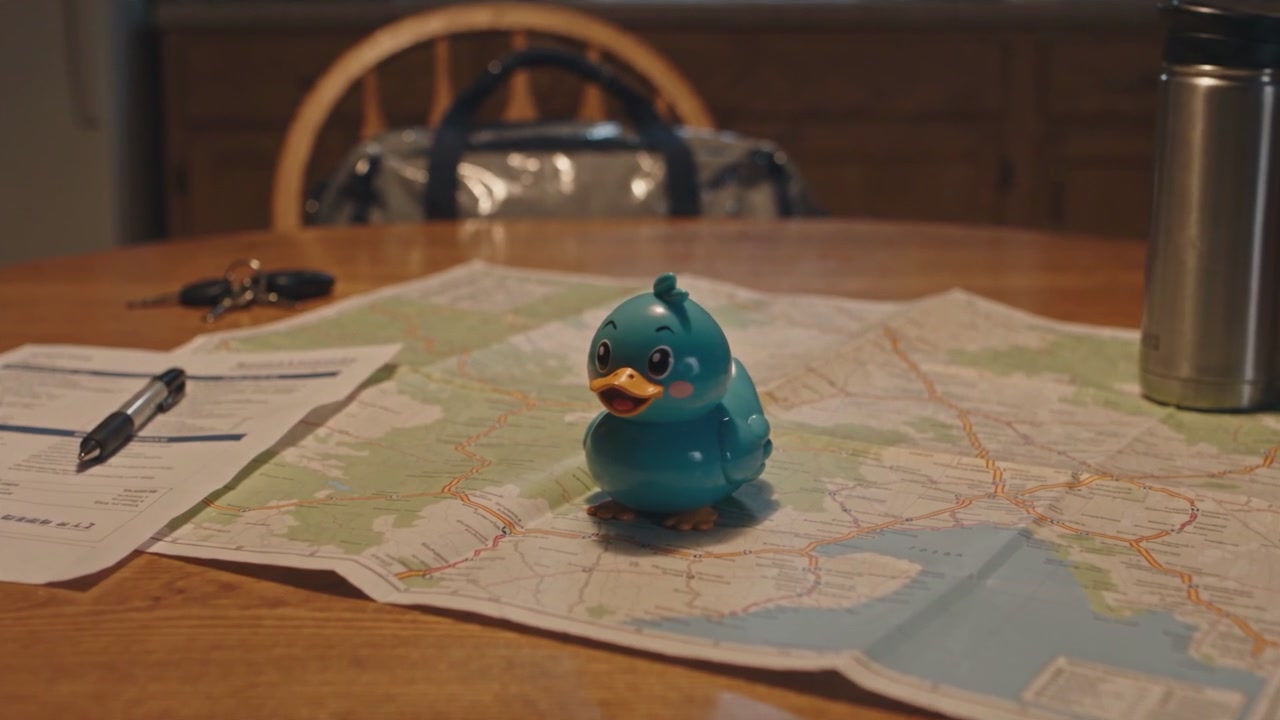
The evening before a road trip: a paper road atlas, a printed route sheet and a thermos on a kitchen table under a warm lamp, with Waddles, RestMap’s duck mascot, sitting on the atlas.
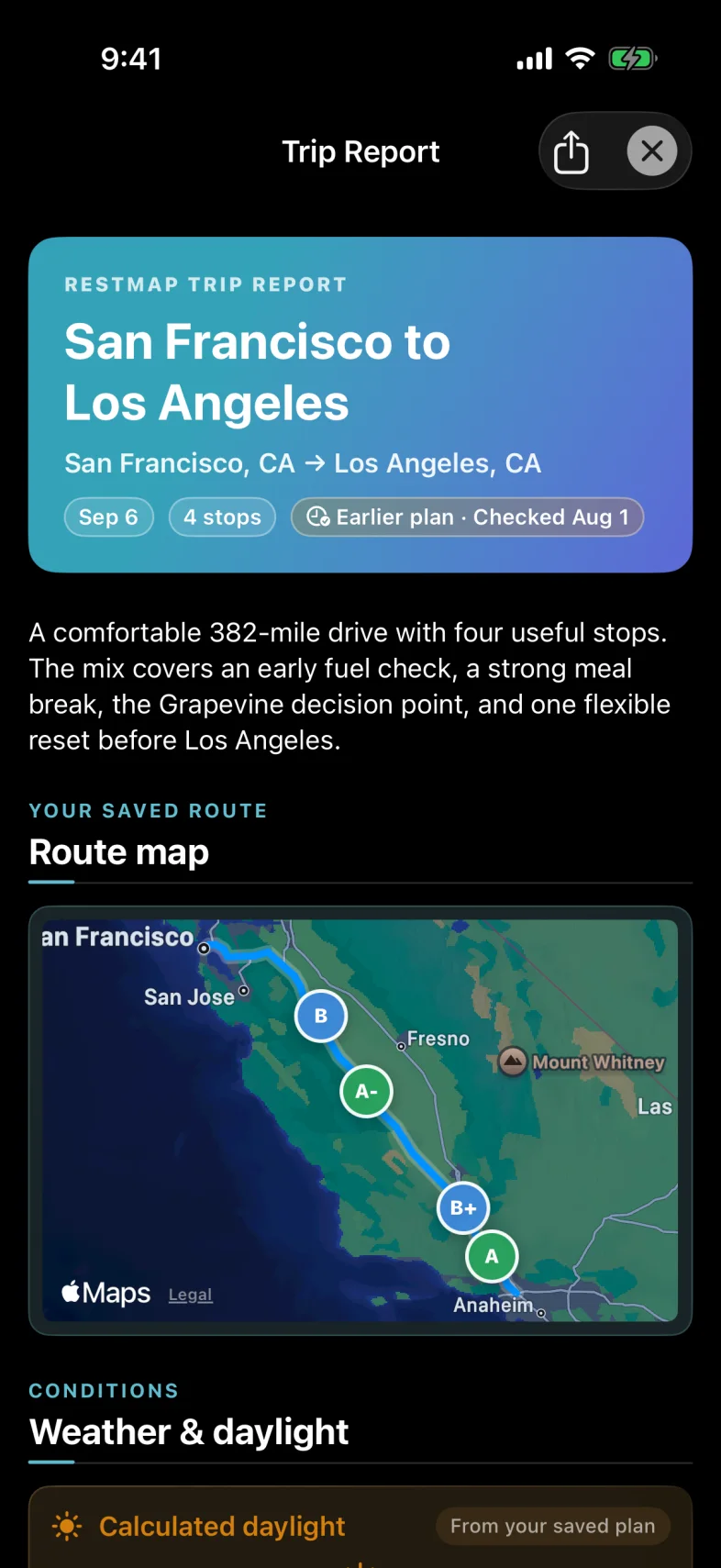
A RestMap Trip Report: the route, its stops and timing, reviewed before leaving.
The night before, with the Trip Report ready to read. The scene is an illustration; the app screen is a native capture.

Finding a restroom stays free.

The map, quality scores, Quick Find, and medical, accessibility, and family data stay free. Premium adds depth for the trip around those stops.

What Premium adds

Prepare once.
Bring the details along.

Place Reports

A Place Report for the whole visit.

Pick a destination or a whole town and get a personal visit guide: what’s worth doing, how it fits your group, arrival, hours and tickets, getting around, food for your diet, step-free and stroller access, your restroom needs, events for your dates, and alternatives if it doesn’t fit.

Start from a park, museum or other place to visit, or search for a town on the map. Review your dates, group, travel and needs first, or make a general guide. Sourced facts show their sources, anything uncertain is listed for you to confirm, and saved reports stay in your library.

Place Reports and Trip Reports share a monthly allowance, shown in the app before you create one. Recheck opening hours, tickets and event times before you go.
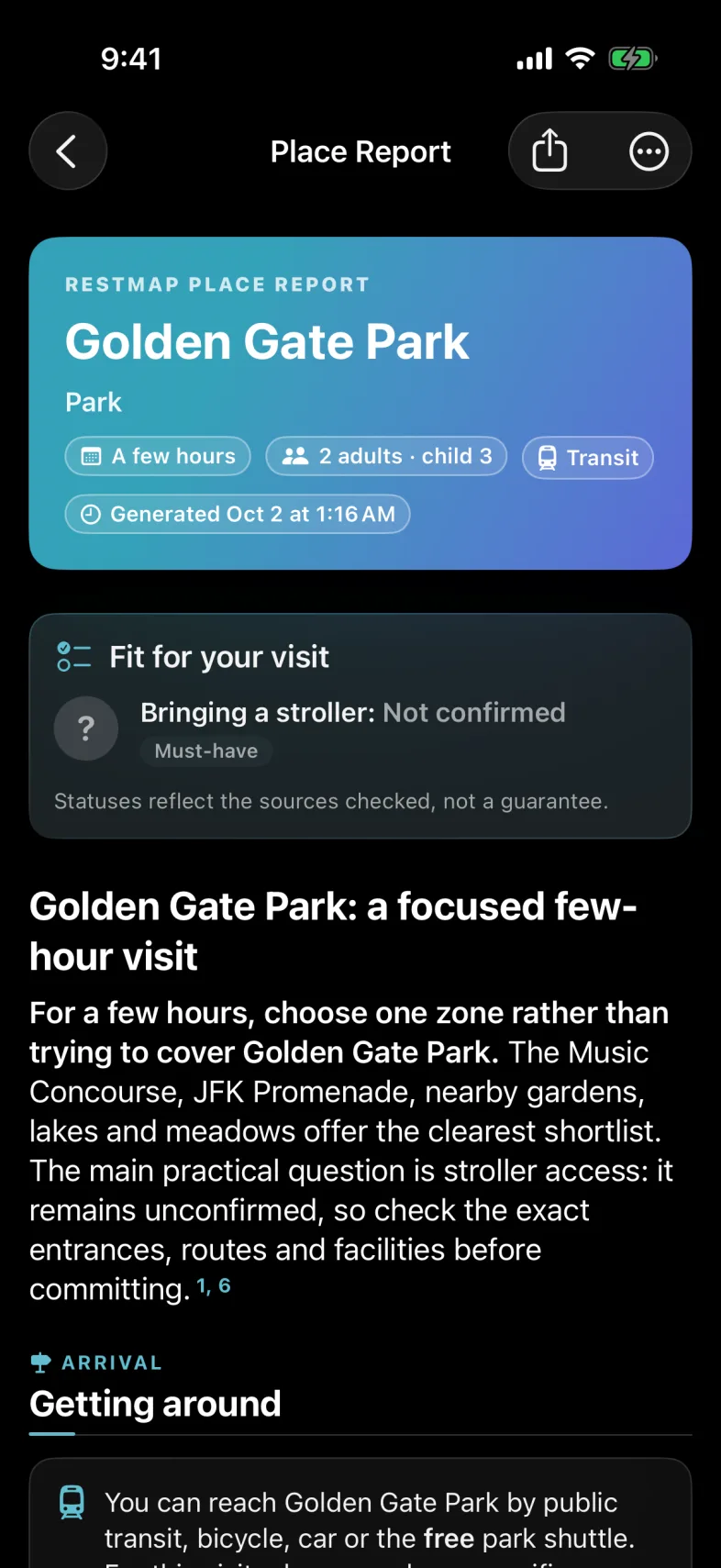
RestMap Place Report for Golden Gate Park: a few hours, 2 adults and a child of 3, by transit. Fit for your visit lists Bringing a stroller as Not confirmed, a must-have, above a summary that suggests choosing one zone of the park and checking stroller access first, then Getting around.
Golden Gate Park, San Francisco. Native app screen, October 2026. View full screen
01

A Trip Report to read, print, or share.

Ask for an AI-reviewed report of your route, stops, timing, and alternatives. Review what gets sent before requesting it, then keep the finished PDF with your plan.

Your first Trip Report is free. Try it on your next trip before deciding on Premium.

Research can miss changes. Check essential details before you leave.

02

Your plan, even when signal is patchy.

Download an Offline Trip Pack before you set off. Keep your saved route, stops, scores, and report, plus a printable glovebox card.

Live traffic, changed hours, new searches, and live rerouting need a connection.

03

More room for a longer journey.

Plan across days and overnight stops. Premium includes 25 Inspects a month to research hours, access, and amenities. Free users can also use Inspector with welcome and earned credits.
The monthly allowance is shared across Inspect types. Daily and fair-use limits apply.

See the place page in the app

The details,
and where they come from.

Open a place and every restroom facility is a tile with a short answer. Tap a tile for the details, the source and its date, and what to do next. Explore these examples from the app.

With kids · Place page

A changing table before the train.

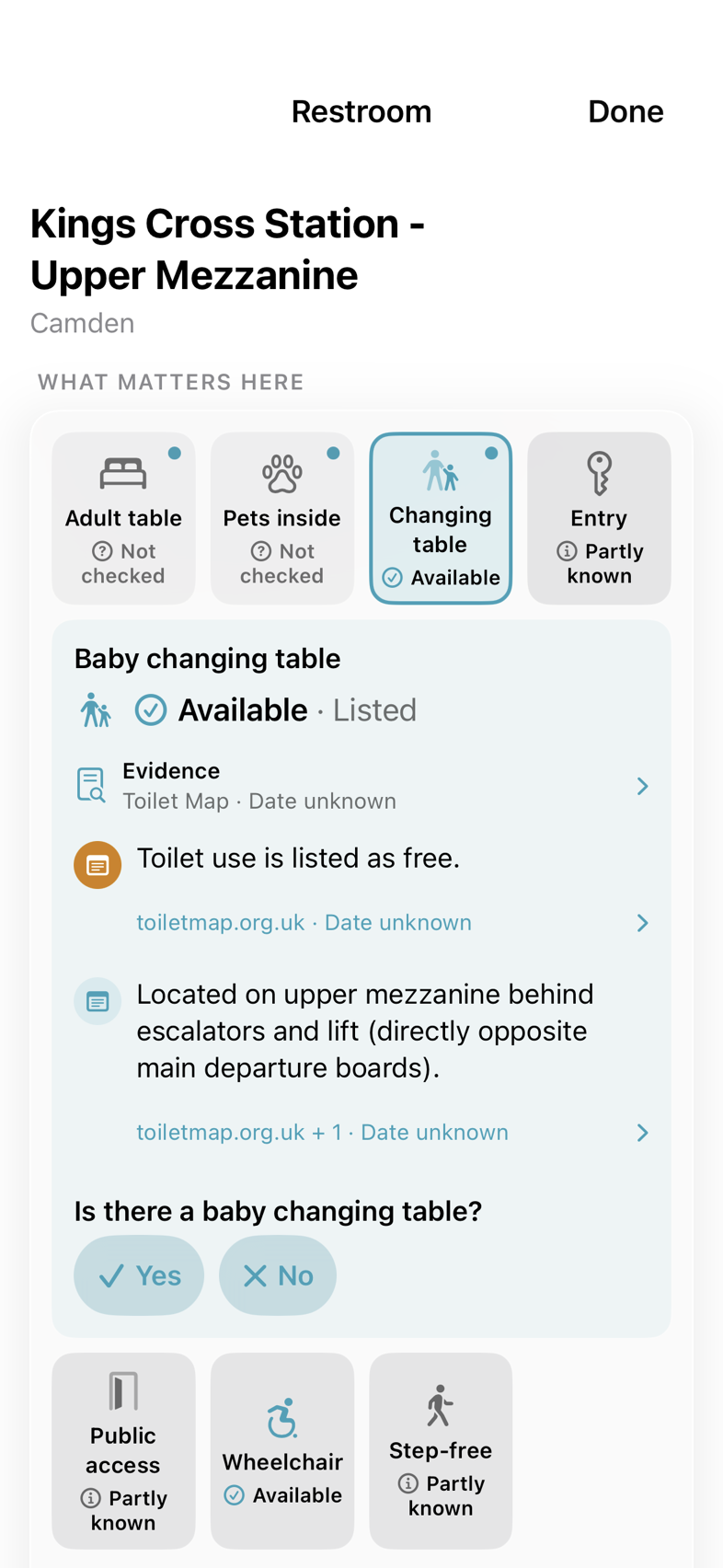
You’re at King’s Cross with a baby and a train to catch. A useful answer includes where the facility is, as well as whether a changing table is listed.

  1. Find the tileChanging table: Available, from a listing.
  2. Get the practical detailsThe card points to the upper mezzanine, behind the escalators and lift.
  3. Know what to checkThe listing is undated and its source is named. If you’ve been there, a tap records what you found.

Looking something up runs Inspector, which uses welcome or earned credits. Premium includes a monthly allowance.

Open a place in RestMap
RestMap place page for Kings Cross Station: the facility board with the changing table tile opened into a card showing a listed baby changing table, its upper-mezzanine location and the toiletmap.org.uk source.
King’s Cross, London. Native app screen excerpt. View full screen

With a pet · Place page

Pet-friendly can mean a lot of things.

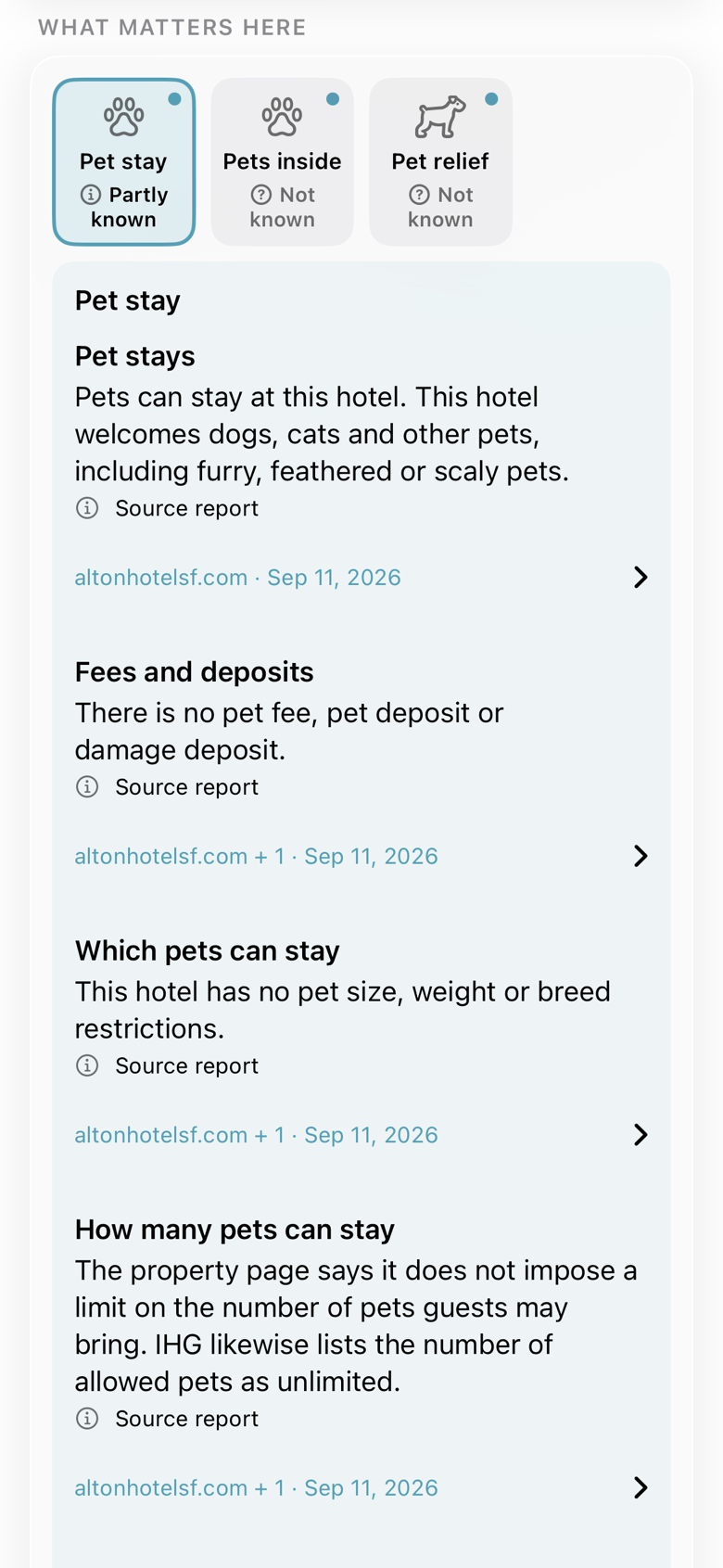
Before booking a night in San Francisco, check the details that affect the stay: pet fees, size limits and where pets can go.

  1. Start from the tilePet stay leads the board when you travel with a pet.
  2. Read beyond the labelThe Alton card separates pet stays, fees and deposits, which pets can stay and how many.
  3. Open the sourceSource names and dates stay beside each finding, ready for a closer look.

Looking something up runs Inspector, which uses welcome or earned credits. Premium includes a monthly allowance.

Open a place in RestMap
RestMap place page for the Kimpton Alton Hotel: the Pet stay tile opened into a card that separates pet stays, fees and deposits, which pets can stay and how many, each with its source and date.
Kimpton Alton Hotel, San Francisco. Native app screen excerpt. View full screen

With care needs · Place page

Check the equipment, not just the label.

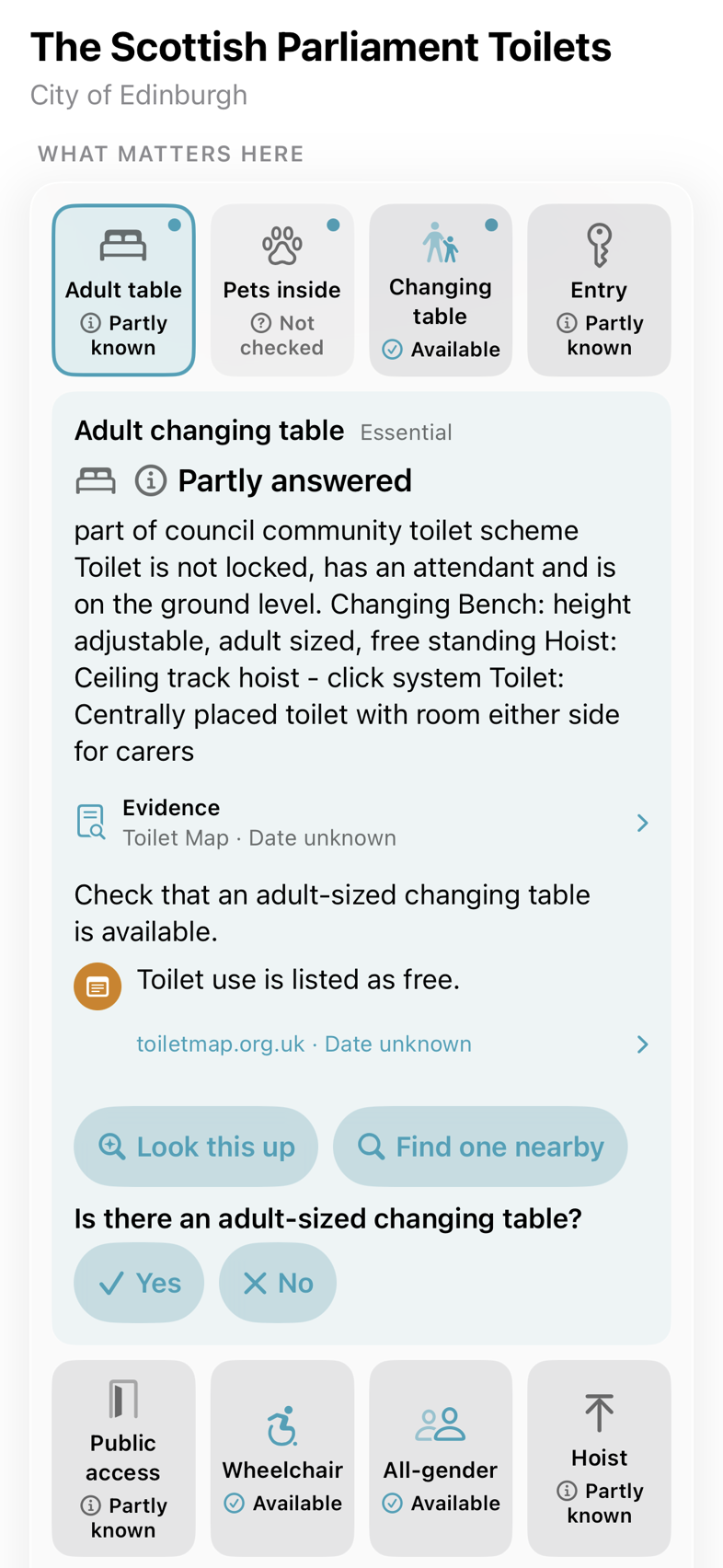
For a day in Edinburgh with someone you care for, an accessible-restroom label may leave an important question unanswered.

  1. See what’s knownAdult table: Partly known. The card explains why.
  2. Read the equipment detailsThis listing describes a height-adjustable bench, a ceiling-track hoist and room for carers.
  3. Choose the next stepLook it up with Inspector, find one nearby, or report what you found on your visit.

Looking something up runs Inspector, which uses welcome or earned credits. Premium includes a monthly allowance.

Open a place in RestMap
RestMap place page for the Scottish Parliament toilets: the adult changing table card describing a height-adjustable bench, a ceiling-track hoist and room for carers, with Look this up and Find one nearby and a yes or no question to confirm the table.
Scottish Parliament, Edinburgh. Native app screen excerpt. View full screen

App examples from September 2026. Details can change. Open the source or check with the venue before relying on a particular facility.

Then compare your options

Same question.
A more useful choice.

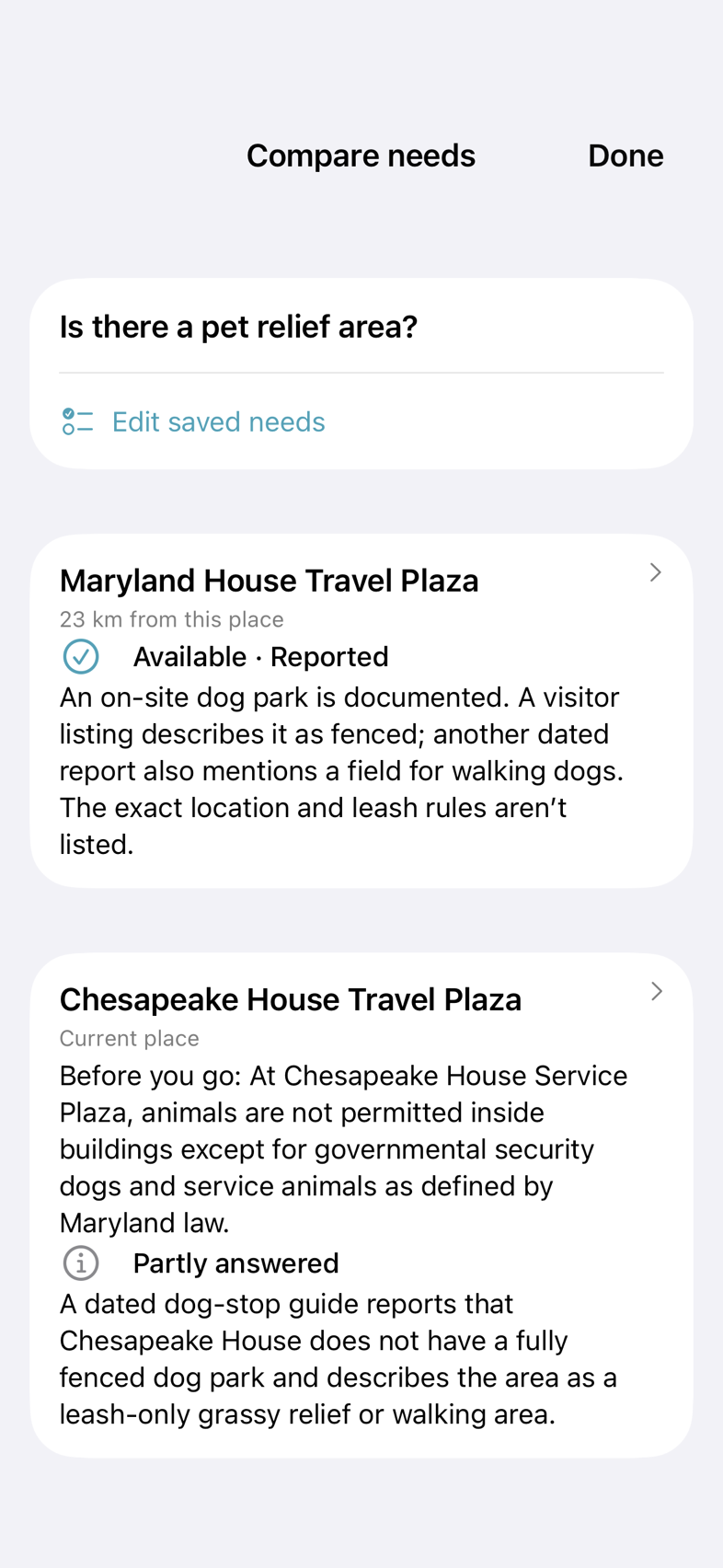
A dog needs a break on I-95. Which stop has information about a pet relief area?

Compare the same need across nearby places. Here, Maryland House has a reported dog park; Chesapeake House has some details about a leash-only walking area. The unanswered questions stay in view.

Explore traveling with pets
Compare needs showing pet relief information for Maryland House and Chesapeake House travel plazas: a reported dog park at Maryland House and a partly answered leash-only walking area at Chesapeake House.
Public stops on I-95, Maryland. Native app screen excerpt. View full screen

US pricing

A month at a time,
or a plan for longer.

The same Premium bundle, whichever option you choose. Check the app for local prices and annual trial eligibility.

Monthly

$2.99 per month

Billed monthly. Renews automatically until canceled. No free trial on the monthly plan.

Annual

$19.99 per year

Starts with a seven-day free trial for eligible subscribers, then billed annually. Renews automatically until canceled.

Prefer one purchase? Lifetime Premium is a single $34.99 purchase, with no subscription renewal.

Family Sharing is included. Manage subscriptions through your Apple account. Cancel the annual trial before it ends to avoid a charge.

Open RestMap on the App StoreFind Premium in the app’s You tab.

Before you choose

Does anything free move behind a paywall?

No. Restroom finding, quality scores, and medical, accessibility, and family data remain free. Premium adds new capabilities.

What happens if I cancel?

Premium stays active until the end of your paid subscription period. Reports and trips you have already created stay on your phone. You can still read, print, and export them. You need Premium to create new reports and use the additional planning tools.

What gets sent for a Trip Report?

Reports run when you request them. Before sending, use “What gets sent” in the app to review the trip research data and any separate public-place matching details. RestMap does not add your name, email, advertising identifier, exact private start or end address, or structured health, accessibility, or family settings to the report content. Read the privacy policy for the full explanation.

Do I need Premium for CarPlay?

No. CarPlay navigation and restroom finding are included in the free app. Premium helps you prepare with Trip Reports, Place Reports, Offline Trip Packs, and more planning tools. Explore CarPlay.

Start with the next stop.

Get to know RestMap for free. Premium is there when you want to plan more of the journey.

Get RestMap free

iOS 26 or later · Optional Premium purchases